
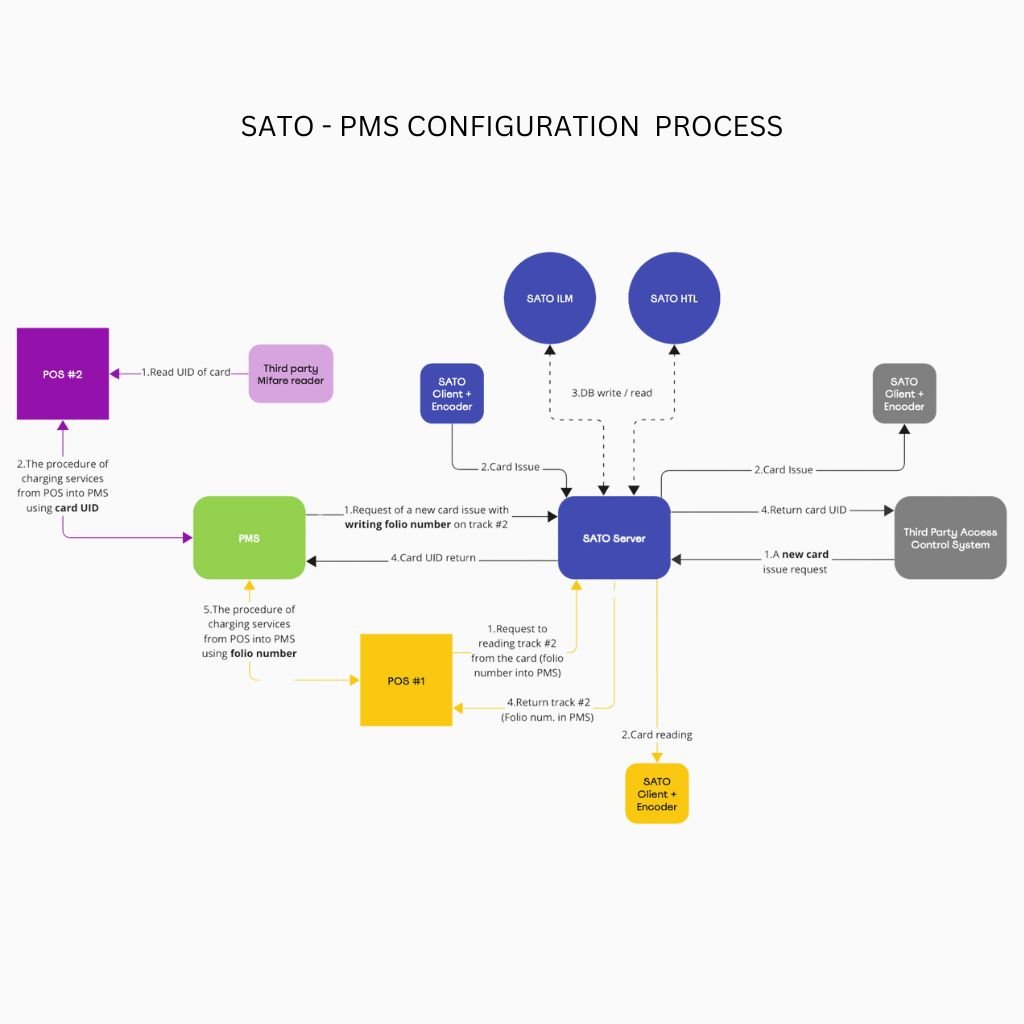
PMS Integration Software

Characteristics

System: HTL / ILM
Card Type: Mifare Classic in offline mode
Indication: Detailed operation log

Installation Condition: Windows 10 /11 or Windows Server 2012 R2 or a new operating system

Compatible PMS: Opera, Opera Cloud, Prologic, IDS, Protel, WinHMS

Computer Connection: TCP/IP for PMS, LAN for an HTL encoder, USB for an ILM encoder

Interface Language: English

Category: Product ID: 1093

Description

  • Issuing guest cards
  • Issuing a copy of a card for the second and subsequent guests staying in the same room
  • Issuing cards for several guest rooms (up to 4) (only for ILM)
  • Reading guest cards
  • Recording additional access areas to a guest card
  • Recording additional information (tracks) when issuing a card, including directly to the Mifare card chip (only for ILM)
  • Support for Unicode characters in the guest’s name, and operator’s name, and track data
  • Automatic blocking of an old card when a new one is issued
  • Guest checkout in ACS when check-out in PMS
  • Return of the keycard serial number when a new card or copy is issued
  • Synchronization of check-in data in PMS and ACS (guest’s name, period of staying, operator, other).


Peculiarities:

  • Protocol used: SATO or FIAS, both TCP/IP ASCII
  • Secure client-server connection: Yes
  • Client-server architecture: Yes
  • Port configuration: Yes
  • Server and client installation on the same machine: Yes
  • Using the same encoder from several workplaces: Yes


Database:

  • Recording keycard issue events to the database: Yes
  • System operation log: Yes
  • Supporting PMS-issued cards by the ACS software: Yes
  • Single database with the ACS software: Yes

The current product version is 5.1

Additional information

Resolution

1.1 – 2.0 MP, 2.1 – 4.0 MP

Color

Black, Gold, Steel

Documents

System Offline, Online, BLE
Model SATO
Card Type Mifare Classic in offline mode
Indication Detailed operation log
Installation conditions Windows 10 /11 or Windows Server 2012 R2 or a newer one operating system
Compatible with PMS Fidelio Suite / Opera, Opera Cloud, Prologic, WinHMS, IDS, Protel
Computer connection TCP/IP for PMS, LAN for an HTL encoder, USB for an ILM encoder
Interface language English

Features:

  • Issuing guest cards
  • Issuing a copy of a card for the second and subsequent guests staying in the same room
  • Issuing cards for several guest rooms (up to 4) (only for ILM offline)
  • Reading guest cards
  • Recording additional access areas to a guest card
  • Recording additional information (tracks) when issuing a card, including directly to the Mifare card chip  (only for ILM offline)
  • Support for Unicode characters in the guest’s name, operator’s name, and track data
  • Automatic blocking of an old card when a new one is issued
  • Guest checkout in ACS when check-out in PMS
  • Return of the keycard serial number when a new card or copy is issued
  • Synchronization of check-in data in PMS and ACS (guest’s name, period of staying, operator, other).

Peculiarities:

  • Protocol used: SATO or FIAS, both TCP/IP ASCII
  • Secure client-server connection: Yes
  • Client-server architecture: Yes
  • Port configuration: Yes
  • Server and client installation on the same machine: Yes
  • Using the same encoder from several workplaces: Yes

Database:

  • Recording keycard issue events to the database: Yes
  • System operation log: Yes
  • Supporting PMS-issued cards by the ACS software: Yes
  • Single database with the ACS software: Yes

How to buy

To purchase a product you like, you need to order it. There are several scenarios for how this can be done.

  1. Choose the product you like and click the “Order” button. When placing an order, fill out the form. Enter information in the fields: full name, phone number and e-mail. Then the manager will call you back to confirm your consent to make the purchase.
  2. Select the product you like and click the “Add to cart” button. Then go to the cart and click “Checkout”. Then fill out the form with contact information and send an application. The manager will contact you for further discussion.
  3. Go to the product card and click “Buy in one click”. After clicking, you need to fill out the form and send an application. The manager will contact you for further discussion.

Reviews

There are no reviews yet.

Be the first to review “PMS Integration Software”

Your email address will not be published. Required fields are marked *